
Backup Signing & Infrastructure
Authored by:


If the default interfaces for either Safe or Squads are down or suspected of being compromised, these alternatives enable continued critical signing operations. As a signer, you should familiarize yourself with these tools and practice signing transactions with your team.
UI Alternatives
EVM Networks
Eternal Safe - Decentralized fork of Safe{Wallet}- GitHub: https://github.com/eternalsafe/wallet
- Hosted (IPFS): https://eternalsafe.eth.limo (requires bring your own RPC)
- Local: Can be downloaded and run locally
Note: Local/alternative UIs may not be actively maintained. Treat them as emergency options and perform extra verification. Please DYOR.
Solana
Squads Public Client - Open source Squads V4 interface- GitHub: https://github.com/Squads-Protocol/public-v4-client
- Features: Verifiable build, self-hostable with Docker, IPFS distribution
- Local: Can be built and run locally
Mobile (Safe)
Safe Mobile Apps- GitHub: https://github.com/safe-global/safe-wallet-monorepo/tree/dev/apps/mobile
- App Store: https://apps.apple.com/us/app/safe-mobile/id6748754793
- Play Store: https://play.google.com/store/apps/details?id=global.safe.mobileapp
RPC Backup Options
Basic guidance:
- Multiple providers: Set up accounts with 2-3 different RPC services
- eg. Alchemy, Infura, Chainstack, Quicknode, Tenderly
- Avoid correlation: Choose providers that don't share infrastructure, if that information is available
- Private RPCs preferred: Public RPC URLs are typically not sufficient for reliable operation
Administrator responsibilities
Ensure signer preparedness:
- Provide access to offline UI tools listed above
- Verify signers have practiced using backup interfaces
- Test backup RPCs during non-emergency periods
- Document procedures for switching to backup infrastructure
Block Explorer Backup Options
EVM Networks
Etherscan provides the default block explorer for nearly all EVM chains. In the event that Etherscan is compromised or goes down, it is important to have backup options that can be used for monitoring and investigating transactions.
Blockscout - Open source Etherscan alternative- https://www.blockscout.com/
- Available for all EVM networks
- Can also be self-hosted, although it requires significant time to run full node and index
More explorers: A broader list of network explorers is maintained here: https://explorer.swiss-knife.xyz/
Solana Networks
Both explorer.solana.com and Solscan are reliable options for Solana transaction exploration and decoding.
explorer.solana.com - https://explorer.solana.com/
- Can be self-hosted using open source code
Solscan - https://solscan.io/
Preparation
It is recommended to download dependencies ahead of time and store them in a secure location so they are easily accessible during emergencies.
EVM Networks
Eternal Safe - Decentralized fork of Safe{Wallet}
Access Options
- GitHub: https://github.com/eternalsafe/wallet
- Hosted (IPFS): https://eternalsafe.eth.limo (requires bring your own RPC)
- Local: Can be downloaded and run locally
Setup
- Select network and enter an RPC URL
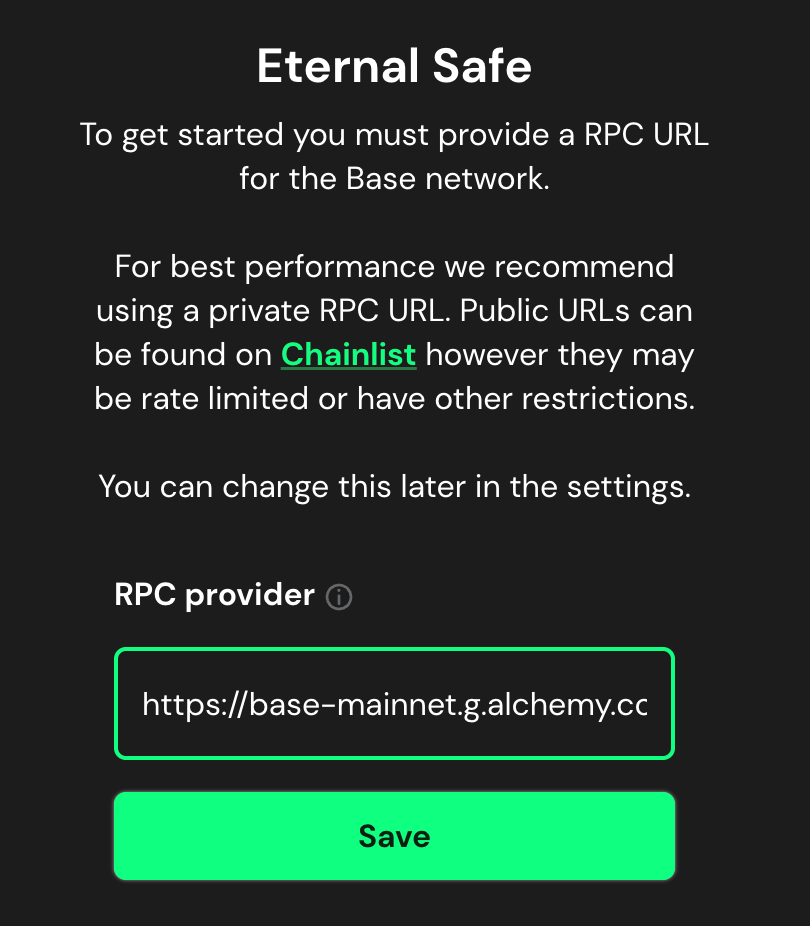
Eternal Safe network selection screen: choose your network and enter an RPC URL
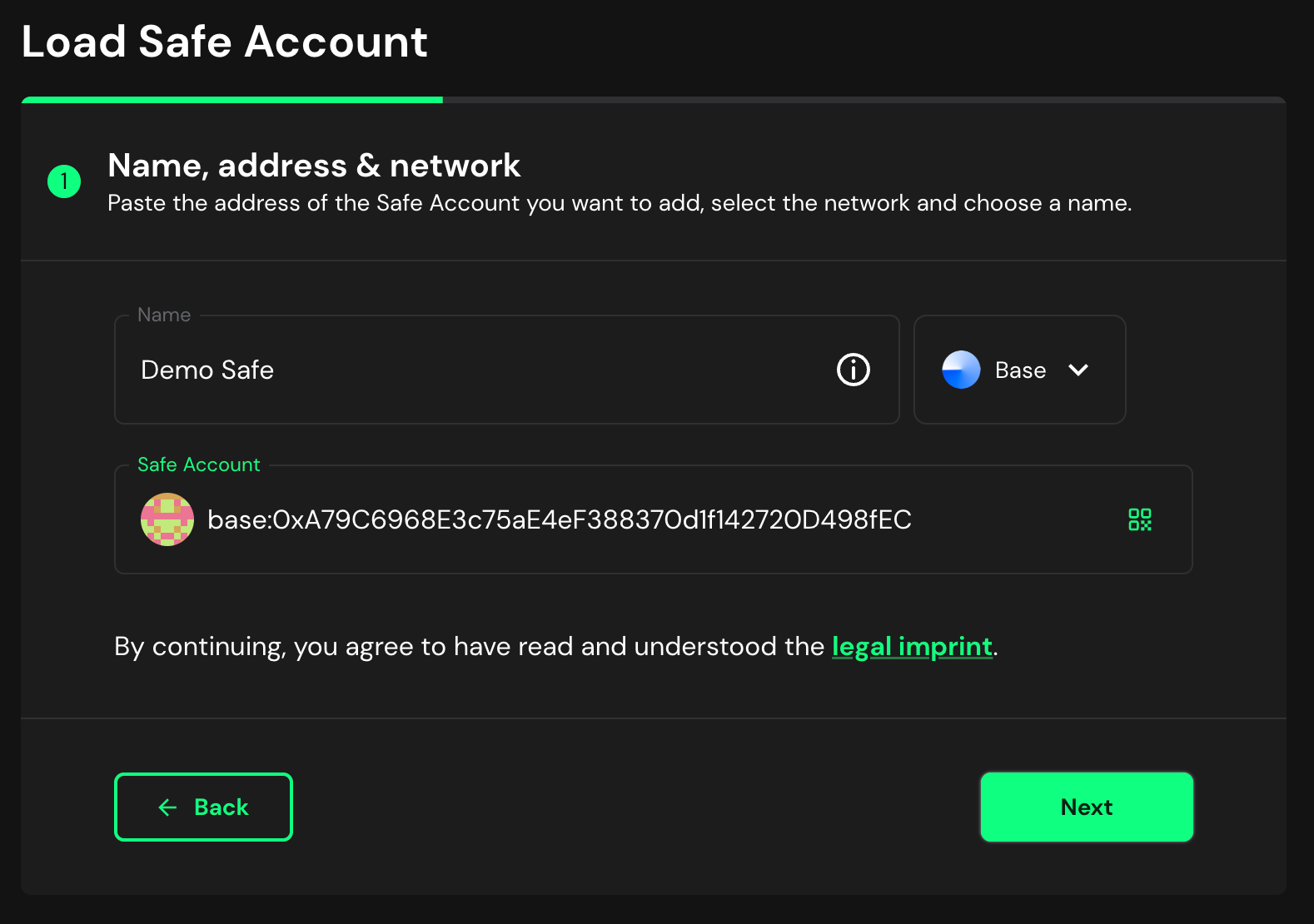
- Enter Safe address and load
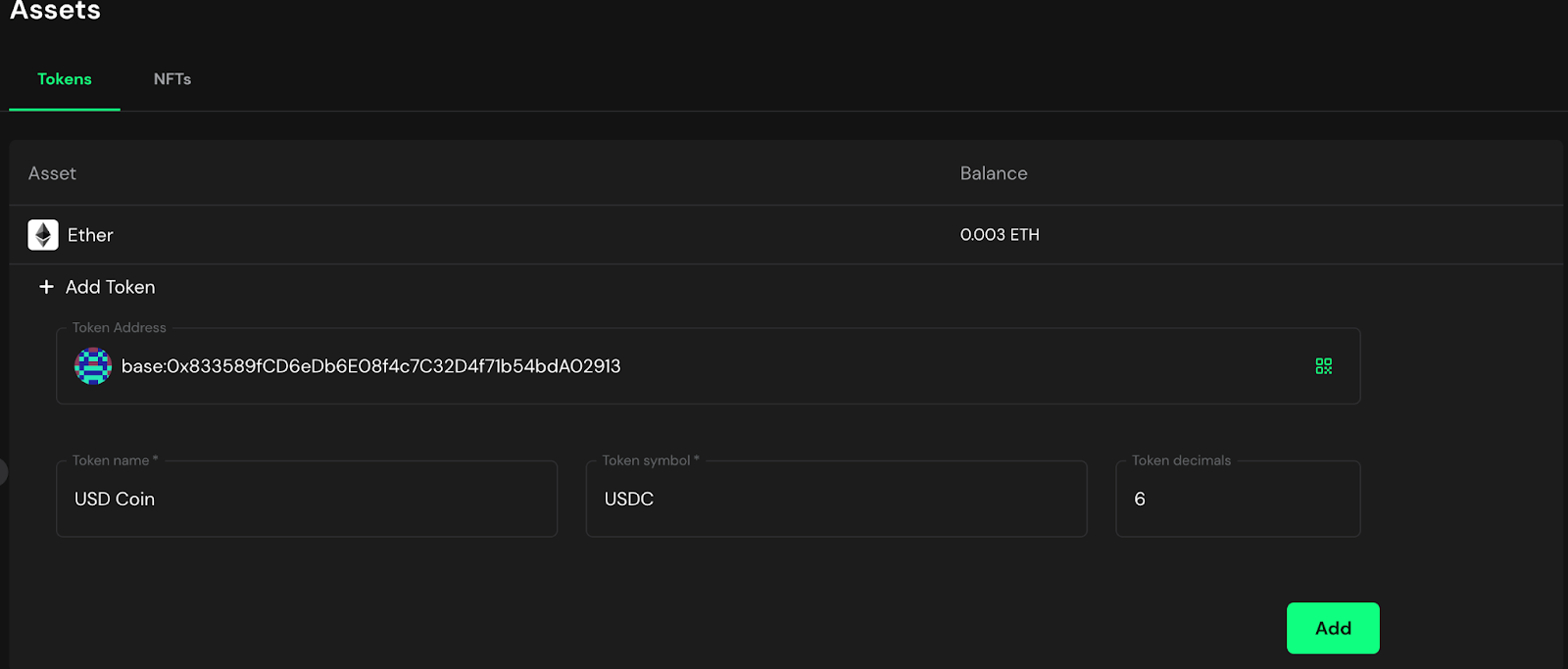
- Eternal Safe will automatically detect Ether balances but not ERC20 tokens. They can be added manually
Transaction Verification
Critical: It is still essential to verify hashes and calldata from Eternal Safe. Follow the verification steps in Safe Multisig: Step-by-Step Verification.
Smart Link System
Once a transaction has been signed by one signer, a Smart Link is created which can be forwarded to the next signer to add their signature. The transactions do not go to any centralized backend.
Example Smart Link:Please sign this Eternal Safe transaction for the Safe: base:0xA79C6968E3c75aE4eF388370d1f142720D498fEC.
Current confirmations: 1 of 2.
https://eternalsafe.eth.limo/transactions/tx/?safe=base:0xA79C6968E3c75aE4eF388370d1f142720D498fEC&tx=eyJzaWduYXR1cmVzIjp7ImRhdGFUeXBlIjoiTWFwIiwidmFsdWUiOltbIjB4NDBiYjMyZjA4NjJkMjI3ODEzYzg2ZmQ4M2E3YjNjOWRiOTA3NGUyYSIseyJzaWduZXIiOiIweDQwYkIzMkYwODYyRDIyNzgxM2M4NkZEODNBN0IzYzlkYjkwNzRFMkEiLCJkYXRhIjoiMHgwZDMxZTZjODIxZjBhMGZlM2M5NmNlZWY4ZDNhM2JhZmU3YmZmZTliODQ0ZWNkYzBkYWNmNzc0MzFkODQ0NjU4MTgwZjUwNmZlMjZiZjMzOTQwY2VhOTJiMzlhNDNjODRkMDRhNThiMGY1ODQ2NzhlNzE0YTllMWJkMzE0NTg5ZjFiIn1dXX0sImRhdGEiOnsiZGF0YSI6IjB4IiwiYmFzZUdhcyI6IjAiLCJnYXNQcmljZSI6IjAiLCJzYWZlVHhHYXMiOiIwIiwiZ2FzVG9rZW4iOiIweDAwMDAwMDAwMDAwMDAwMDAwMDAwMDAwMDAwMDAwMDAwMDAwMDAwMDAiLCJub25jZSI6NCwicmVmdW5kUmVjZWl2ZXIiOiIweDAwMDAwMDAwMDAwMDAwMDAwMDAwMDAwMDAwMDAwMDAwMDAwMDAwMDAiLCJ2YWx1ZSI6IjEwMDAwMDAwMDAwMDAwMDAiLCJ0byI6IjB4RTBiY2ZlNWUzMEFCYTBCNDZmMTNCMEMyNENiQzQ3MERDQTNlYjg2NSIsIm9wZXJhdGlvbiI6MH19Execution
Once all signatures are collected, execute the transaction. Note: Prior to execution you can manually simulate using Tenderly by entering the transaction data, but an automatic simulation link will not be available.
Solana
Squads Public Client - Open source Squads V4 interface
Access Options
- GitHub: https://github.com/Squads-Protocol/public-v4-client
- Hosted: https://backup.app.squads.so/
- Features: Verifiable build, self-hostable with Docker, IPFS distribution
- Local: Can be built and run locally
Setup
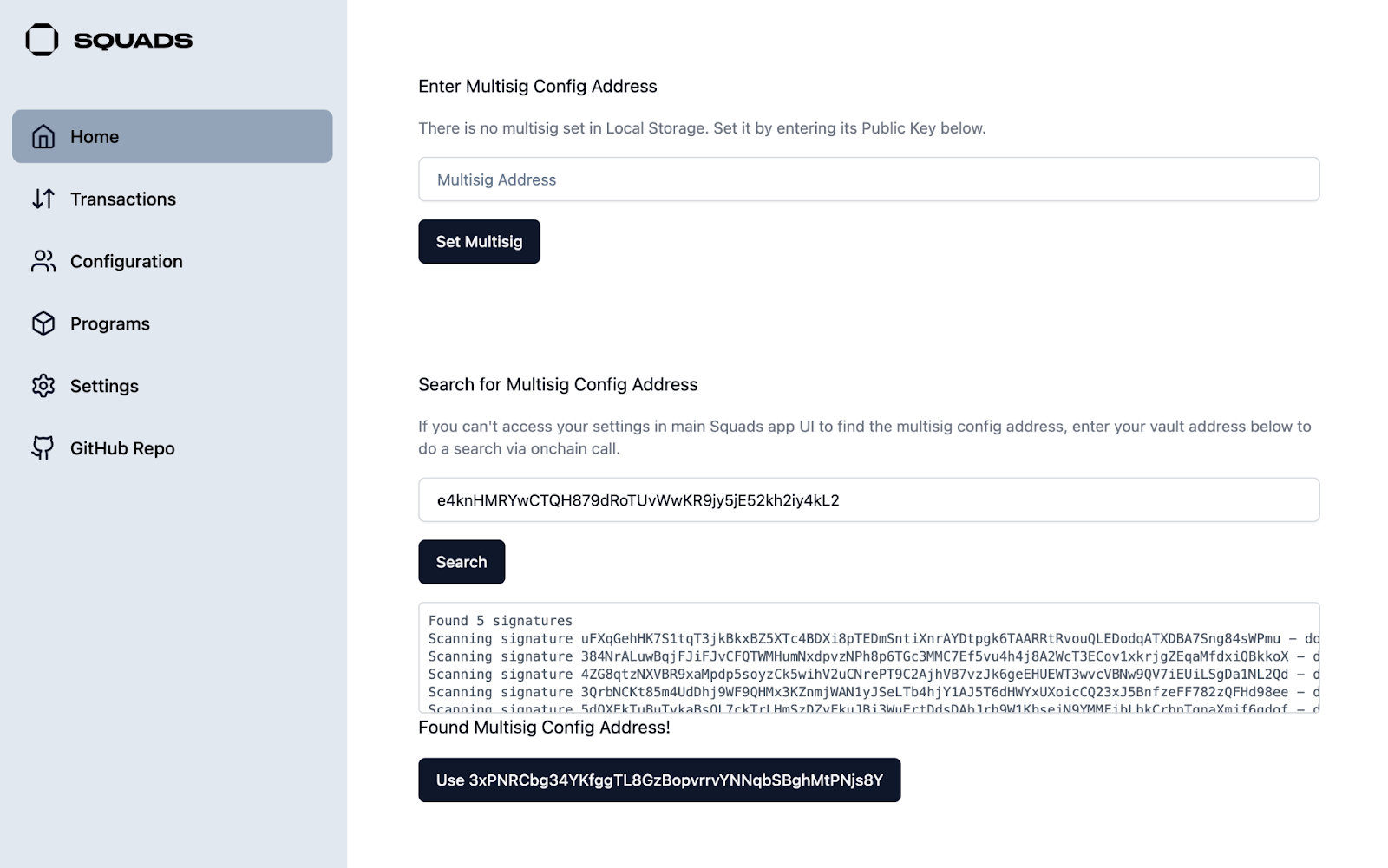
- If running locally, follow setup instructions in https://github.com/Squads-Protocol/public-v4-client and access via http://localhost:8080
- Enter RPC URL in settings
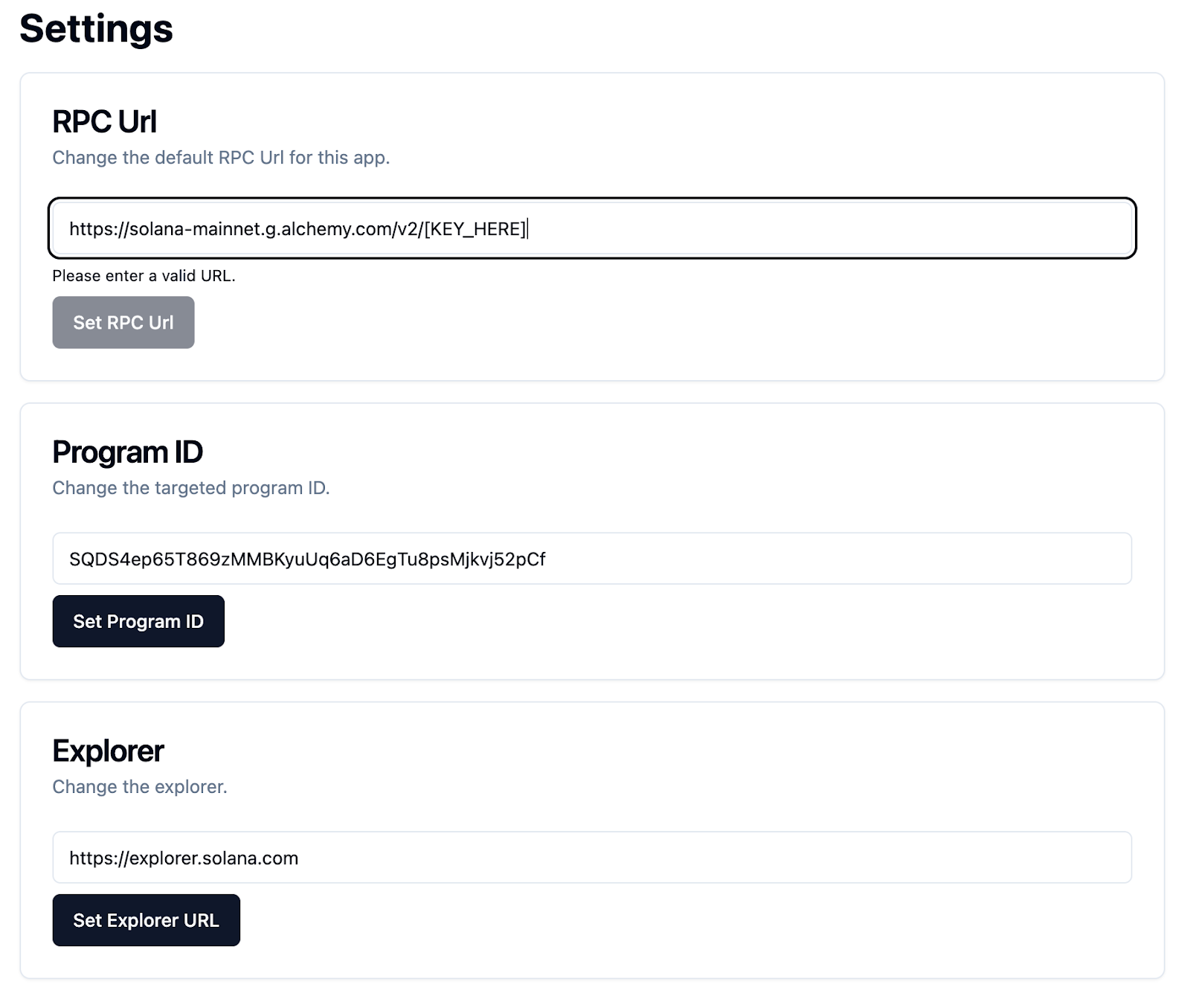
- Enter multisig address in the lower text box (Search for Multisig Config) and select the detected Multisig Config
Transaction Operations
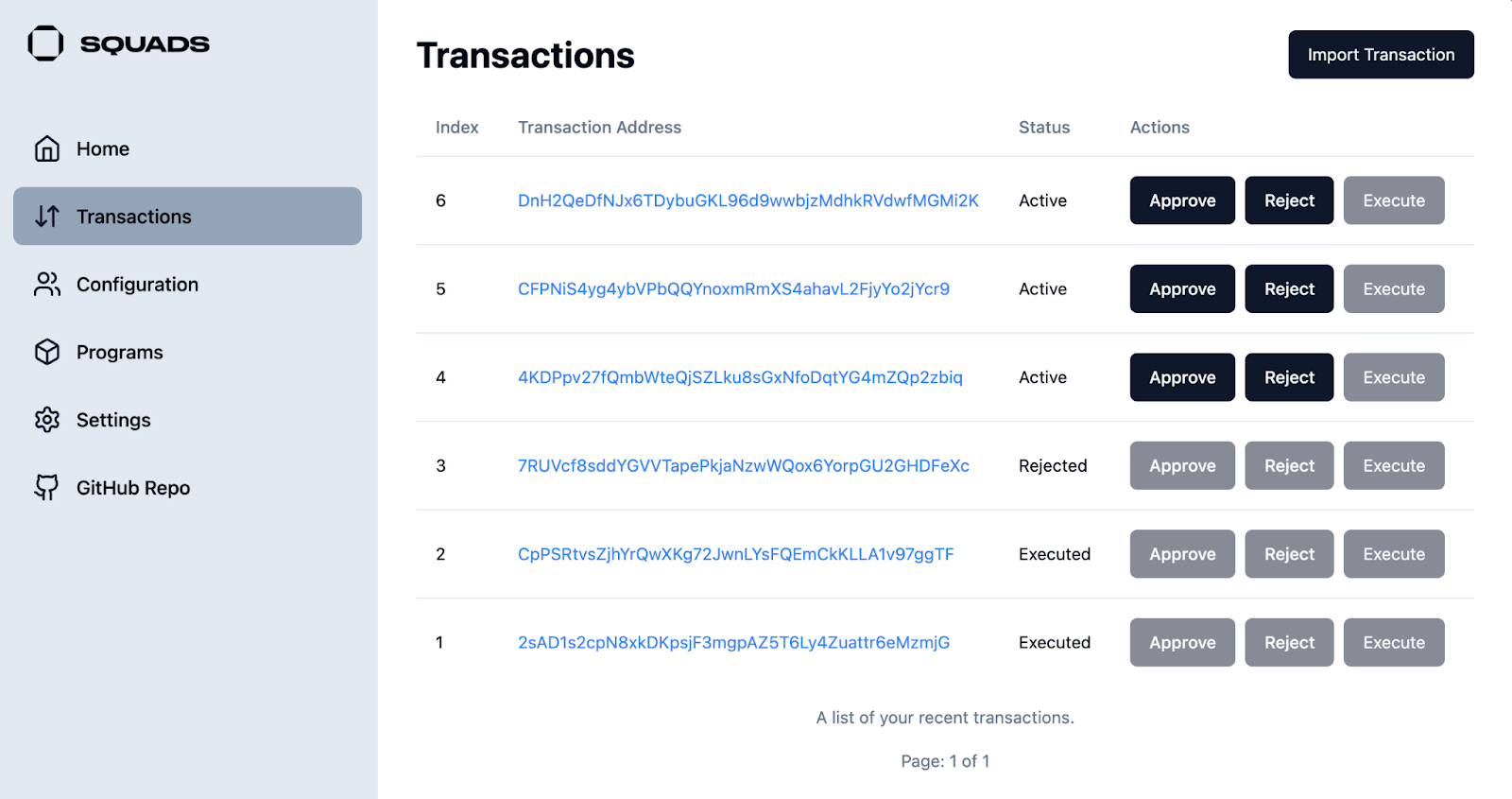
- Create, approve, or execute transactions. Smart Links are not needed for Solana as all transactions are on chain and accessible via the RPC without an API
Security Considerations
Enhanced Verification
When using backup systems:
- Extra caution required: Be more thorough with verification procedures
- Multiple verification methods: Use additional tools to cross-check transaction details
- Team confirmation: Verify with other signers before proceeding with critical transactions
- Documentation: Record use of backup systems and any issues encountered
Risk Assessment
- Delay non-critical operations: Consider postponing non-urgent transactions until primary systems recover
- Emergency operations only: For critical emergency responses, proceed with enhanced verification
- Communication: Keep team informed about system status and verification procedures
Testing and Preparation
Regular Practice
- Monthly testing: Practice using backup interfaces during normal operations
- Team coordination: Ensure all signers can operate backup systems
- Process documentation: Update procedures based on practice sessions
Emergency Drills
- Simulated outages: Practice coordinating with backup systems during drills
- Communication testing: Verify backup communication channels work with backup UIs
- Time measurement: Track how long backup system activation takes
Troubleshooting
Common Issues
- RPC connectivity: Switch to alternative RPC providers if connection fails
- Transaction loading: Refresh or try different network endpoints
- Signature verification: Use multiple verification tools when in doubt
Support Resources
- GitHub documentation: Refer to project documentation for technical issues
- Team assistance: Coordinate with other signers for problem-solving
- Alternative tools: Have multiple backup options available
Related Documents
- Safe Multisig: Step-by-Step Verification - Verification procedures
- Emergency Procedures - General emergency response
- Communication Setup - Backup communication during outages